Zaps API
Uniswap V2’s user-friendly codebase has been widely adopted and adapted, influencing numerous networks and derivative projects like Solidly. However, its requirement for liquidity to be added or removed in strict 50/50 ratios has led to a less-than-ideal user experience. In cases where users provide imbalanced ratios, the excess is forfeited, resulting in fewer LP tokens during minting or an enforced 50/50 split upon burning. Odos improves this by accepting any ratio of tokens and converting them efficiently into the most advantageous LP tokens in a single transaction.
Before Odos Zaps
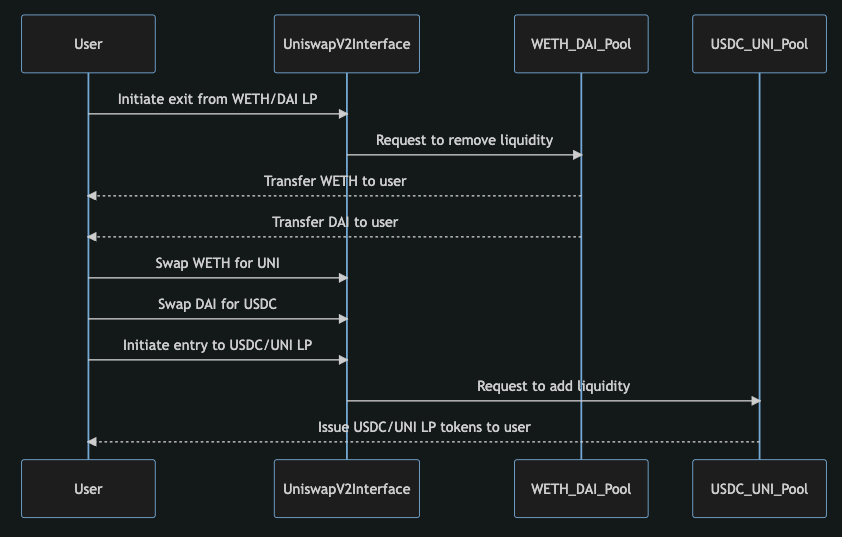
In order to exit a liquidity position and enter a new one, a user must make a minimum of 4 transactions. Below is an example of going from a LP position in Uniswap V2 to another one. For this example, the pools will be WETH/DAI and USDC/UNI
- Remove liquidity from WETH/DAI
- Swap WETH for UNI
- Swap DAI for USDC
- Deposit liquidity into USDC/UNI pool
During these transactions, the market may move, or slippage may occur, resulting in less than a 50/50 split of assets.
After Odos Zaps
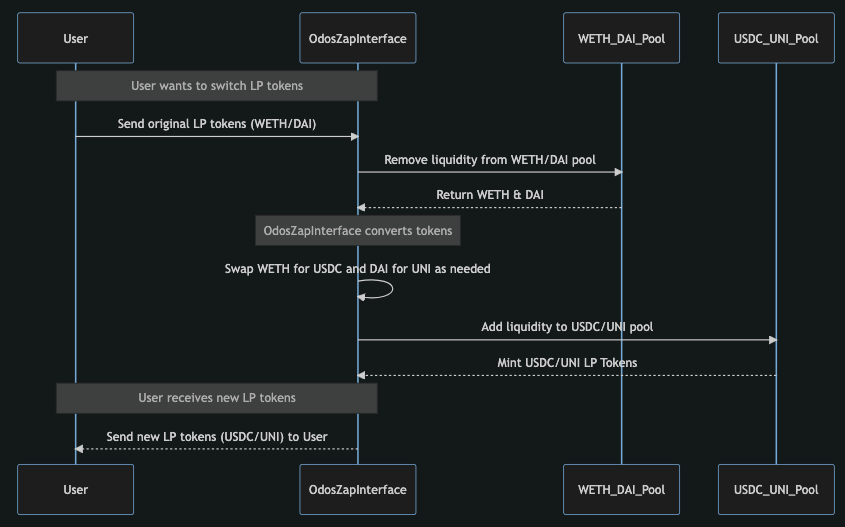
Odos simplifies the process of moving from an LP to another LP — performing it perfectly in a single atomic transaction.
Supported Pools
Odos Zapping supports Uniswap V2 and Solidly-style pools, along with minting and burning of Curve LP tokens for StableSwap pools within the Odos SOR.
Optimal Rebalancing
Odos strives to distribute your input evenly across a pool’s 50/50 ratio requirement. However, price fluctuations during the transaction can create an imbalance, resulting in a surplus that the pool won’t accept and could be lost. To avoid this, Odos Zaps employ two protective measures:
- For standard Uniswap V2 pools – It calculates the exact swap amount to align your contribution with the current pool reserves, optimizing the use of your funds.
- For non-standard pools – It can return any surplus tokens to your wallet, ensuring you’re only contributing what’s needed for LP tokens.
Since both options incur a small additional gas cost, they are only performed if the wasted amount exceeds a threshold.
Multi-input Zaps
With Odos Zapping, users can adjust their positions across multiple liquidity pools or specific tokens in one step. This is ideal for streamlining portfolio rebalancing or exiting LPs efficiently.
You can go from many LP positions into a single LP position or into multiple tokens.
Summary of what's possible:
- Any number of tokens → a single LP
- Any number of LPs → a single LP
- Any number of LPs and tokens → a single LP
- Any number of LPs and tokens → multiple tokens
Usage
Odos Zaps are accessible through the Odos API and use the same smart contract router as the core SOR service. This eliminates the need for new approvals, minimizing risk. Existing Odos users can easily use Zaps to enter or exit LP positions.
Fees
When using Odos Zaps, the router always uses the swapMulti function, which incurs a 0.01% fee.
No additional fees are collected from positive slippage when swapMulti is used.
Types of Zap Quotes Supported by Odos
The following request bodies can be sent to the /sor/quote/v3/zap endpoint:
Zap into a single pool using a single asset
1 WETH → Uniswap V2 LP Position WETH/USDC Pool
{
  "chainId": 1,
  "inputTokens": [
    { "amount": "1000000000000000000", "tokenAddress": "0xC02aaA39b223FE8D0A0e5C4F27eAD9083C756Cc2" }
  ],
  "outputTokens": [
    { "proportion": 1, "tokenAddress": "0xB4e16d0168e52d35CaCD2c6185b44281Ec28C9Dc" }
  ],
  "referralCode": 0,
  "slippageLimitPercent": 0.3,
  "userAddr": "0x...",
  "compact": true
}
Zap into a single pool using multiple assets
100 DAI + 250 USDC → Uniswap V2 LP Position WETH/USDC Pool
{
  "chainId": 1,
  "inputTokens": [
    { "amount": "100000000000000000000", "tokenAddress": "0x6B175474E89094C44Da98b954EedeAC495271d0F" },
    { "amount": "250000000", "tokenAddress": "0xA0b86991c6218b36c1d19D4a2e9Eb0cE3606eB48" }
  ],
  "outputTokens": [
    { "proportion": 1, "tokenAddress": "0xB4e16d0168e52d35CaCD2c6185b44281Ec28C9Dc" }
  ],
  "slippageLimitPercent": 0.3,
  "userAddr": "0x..."
}
Step 0: Check Zap Pool/Token is Routable
Before requesting a quote, you can check if a pool or token is routable by calling:
GET /pricing/token/{chain_id}/{zap_token_addr}
- Python
- JavaScript
import requests

chain_id = 1
zap_token_addr = "0xB4e16d0168e52d35CaCD2c6185b44281Ec28C9Dc"
zap_price_url = f"https://api.odos.xyz/pricing/token/{chain_id}/{zap_token_addr}"

response = requests.get(zap_price_url)
price_res = response.json()

if response.status_code == 200 and "price" in price_res:
    print(price_res["price"])
else:
    print(f"Routing unavailable for {zap_token_addr}")
const chainId = 1;
const zapTokenAddr = '0xB4e16d0168e52d35CaCD2c6185b44281Ec28C9Dc';
const zapPriceUrl = `https://api.odos.xyz/pricing/token/${chainId}/${zapTokenAddr}`;

const response = await fetch(zapPriceUrl);
const priceRes = await response.json();

if (response.status === 200 && priceRes.price) {
  console.log(priceRes.price);
} else {
  console.error('Routing unavailable for', zapTokenAddr);
}